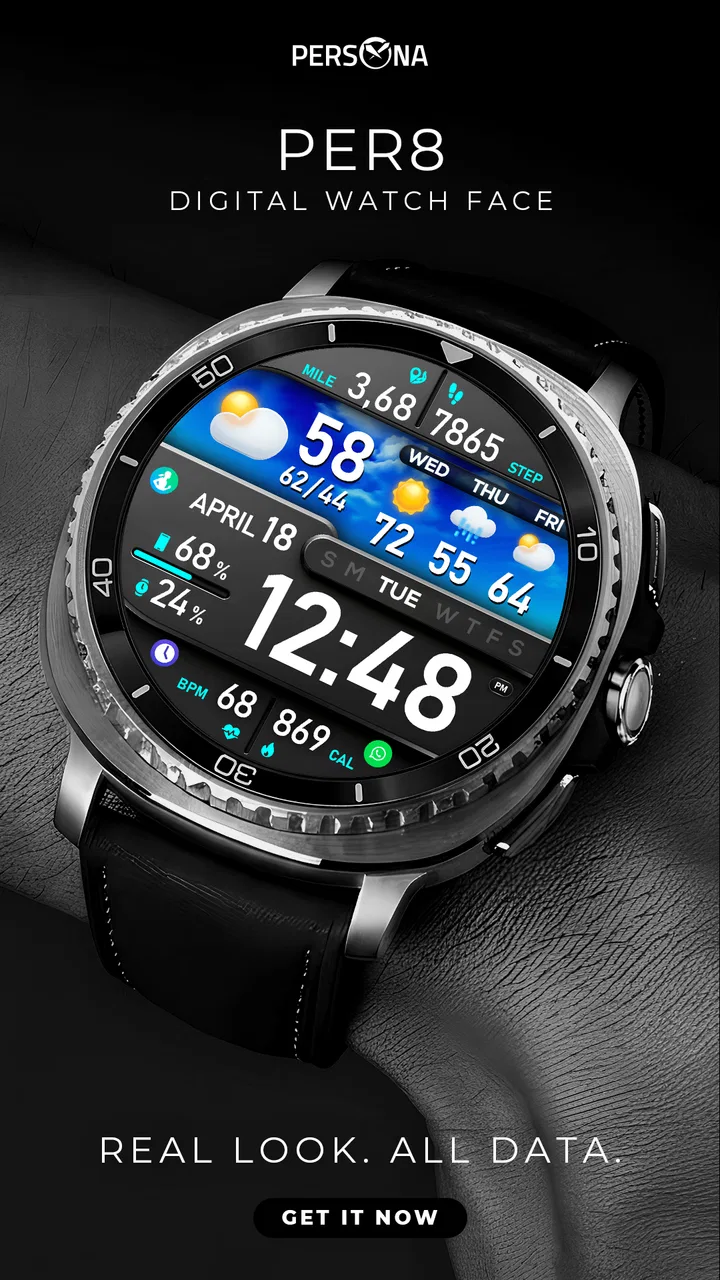
PER8 Digital Watch Face
- 4.0
- Rating
- 10.00K
- Installs
- $2.99
- Price
 Analysis by App-foxy
I approached PER8 Digital Watch Face as a small personalization purchase rather than a major app installation, and that is the right way to judge it. Its purpose is focused: it gives a Wear OS watch a distinctive animated digital face instead of leaving the display with a standard layout. I like that narrow ambition because a watch face should be quick to understand, easy to live with, and visually comfortable throughout the day. PER8 is most interesting when you want your wrist to feel more designed and less like a miniature phone.
The face comes from PERSONA Watch Face, a developer concentrating on this particular kind of wearable customization. It is a paid app costing $2.99, aimed at Everyone, and it sits in the personalization category. That combination tells me who should consider it: someone who already owns a compatible Wear OS watch and is willing to spend a little for a more expressive appearance. It is not trying to replace a fitness platform, messaging tool, or phone companion. The value is in the repeated, everyday glance.
How PER8 feels when the watch depends on its connection
The first important point is that the phone and watch relationship shapes the setup experience. A watch face is displayed on the watch, but getting a paid design onto the correct wearable normally involves the connected device ecosystem, account access, and the relevant app store flow. That means PER8 should be judged in two phases: the initial installation and the later act of actually using the face on your wrist. The second phase is where a design like this earns its place, because you interact with it through dozens of brief glances rather than long sessions.
You May Also Like

 Blood Strike: 2.5 Anniversary
Blood Strike’s Loadouts Turn Every Drop Into a Tactical Gamble
A close look at Blood Strike’s custom loadouts: how fast access to signature weapons reshapes its battle royale rhythm, rewards preparation, and narrows the gap between fights.

 Pandora - Music & Podcasts
Pandora’s Music Is Easy to Start, but Harder to Recover
Pandora’s strength is its low-effort path from a seed to a station. Its weak spot is how much confidence it asks you to place in connection, setup, and quiet recovery.

 8 Ball Pool
8 Ball Pool Is Built on Rivalries, Rematches, and Routine
A close look at the rivalries, rematches, shared routines, and unanswered safety questions that turn a quick pool match into a persistent mobile community.

 Samsung Music
Samsung Music’s Quiet Strength Is Playing What You Already Own
Its reach comes less from spectacle than from dependable access to a personal library. That simplicity is both the app’s strongest retention engine and its ceiling.

 AccuWeather: Weather Radar
AccuWeather Review: A Quick, Clear Forecast for Everyday Decisions
For everyday plans, the best forecast is the one you can understand quickly. AccuWeather makes rain timing, radar, and local conditions easy to act on, with a few trade-offs.

 Hill Climb Racing
Why Hill Climb Racing Still Turns Crashes Into One More Run
A tiny car, a bumpy hill and one more upgrade: Hill Climb Racing keeps resurfacing because its simple chaos makes every near-miss feel personal.
More From Our News Desk



Connectivity matters most when you are installing, selecting, or changing the face. If the watch and phone are communicating properly, the process should feel like ordinary Wear OS customization. If the connection is interrupted, the frustration is not really about the artwork; it is about the distance between choosing a design on one device and seeing it appear on another. I recommend doing the installation while the watch has a comfortable charge and the phone is nearby. That simple habit avoids blaming the face when the real issue is a stalled wearable connection.
There is also a useful distinction between a network-dependent moment and a network-dependent lifestyle. The purchase and setup can involve the connected Android ecosystem, but the appeal of a watch face is that, once selected, it becomes part of the watch’s normal display rather than something you open for a dedicated session. I would not choose PER8 for a workflow that requires constant phone interaction. I would choose it for the visual identity it gives the watch after the initial setup has been completed.
The animated treatment is the feature that separates this design from a plain digital clock. Animation can make a face feel alive, but it also changes how I evaluate it. A static face can disappear into the background; an animated one asks whether its movement remains pleasant after repeated exposure. PER8 works best for users who enjoy a little motion on the wrist and do not want their watch to look completely utilitarian. If you prefer the calmest possible display, a simpler static face may be a better match.
What the mobile context changes
I found the mobile context especially relevant for people who switch between several watch faces. A phone is usually the more convenient place to browse and manage wearable designs, while the watch is where the final decision is experienced. PER8 therefore needs to be considered as part of a two-screen routine: the phone handles the practical side, and the watch supplies the visual result. That division is normal for Wear OS, but it is worth remembering before buying a face on impulse.
A realistic everyday scenario is a commuter leaving home in the morning. They check the time while walking to a train, glance again before a meeting, and look down during a short pause rather than pulling out the phone. In that situation, the face’s success depends on immediate readability and whether the animation feels distracting during repeated checks. PER8 has a clear advantage over opening a phone app: the design is already present on the wrist. The trade-off is that a decorative animated face may not suit a formal setting or a user who wants the most restrained possible appearance.
Another scenario is a person who uses the watch as a small personal accessory. They may coordinate a casual outfit, choose a watch strap, and then select a face that gives the whole device more character. Here, PER8 makes more sense than a default digital layout because the watch becomes part of the wearer’s style. I would particularly recommend it to someone who notices visual details and enjoys changing the mood of a device without buying new hardware.
On the other hand, someone who treats the watch primarily as a health dashboard should think carefully. The verified description identifies PER8 as an animated digital Wear OS watch face, not as a specialized training interface. If your priority is seeing workout information, recovery details, or a dense collection of complications at a glance, you should compare it with a face designed around those needs. A visually strong design is not automatically the most informative one.
My practical advice is to decide what you want to see during a two-second glance before installing. If the answer is simply the time in a digital presentation, PER8’s focused concept is appealing. If the answer includes several live indicators, detailed schedules, and extensive customization, the usual utility-first alternatives may serve you better. This is one of the clearest trade-offs: PER8 appears designed to make the watch look distinctive, not to turn it into a crowded control panel.
What happens when setup goes wrong
The most likely friction point is not daily use but recovery after a failed installation, a delayed synchronization step, or an unexpected switch back to another face. Wearable software can be confusing because the purchase may be made on one device while the visible result belongs to another. I would first check that the intended watch is connected, then reopen the watch-face selection area and look for PER8 there before repeating the purchase process. That sequence is safer than assuming the app must be bought again.
If the face does not appear immediately, patience is useful. A connection can take a moment to catch up, especially when the phone and watch have recently been separated. Keeping both devices close, confirming that the watch is unlocked, and returning to the face-selection screen are sensible recovery steps. These are not special PER8 features; they are the kind of practical habits that make any Wear OS face easier to manage. The important point is to separate a delivery problem from a design problem.
I also recommend taking a screenshot or noting which face you were using before experimenting with a new one. That gives you a familiar fallback if the new design is not comfortable. It is a small but valuable workflow improvement: try PER8 when you have time to evaluate it, rather than during a rushed morning when you need the watch to behave predictably. A face is easy to change, but a rushed setup can make a minor inconvenience feel like a purchase mistake.
Recovery is also about expectations. A dedicated watch face is not the same as a general personalization suite. You should not expect the installation experience to resemble a full phone launcher or a theme engine. PER8’s appeal is concentrated in the face itself. Once you understand that, a connection issue is easier to troubleshoot because there are fewer moving parts to evaluate.
The animated nature creates another kind of recovery decision: deciding whether the visual movement suits you after several hours. My suggestion is to test it across different situations rather than judging it during the first minute. Look at it indoors, outside, while walking, and during a quiet meeting. If the motion keeps drawing your attention when you only want the time, switch back to your previous face. Paying for a design does not obligate you to keep it active all day.
Using it thoughtfully when data and battery matter
Connectivity and data-conscious use are related, but they are not identical. The main question is when you need the phone or network, not whether every glance at the watch should become a connected event. I would handle PER8 as a display customization: complete the account and installation steps deliberately, then avoid unnecessary repeated downloads or constant switching. That keeps the experience simpler and reduces the number of moments in which phone connectivity becomes relevant.
Animated visuals can also influence how a battery-conscious user feels about a watch face. I will not pretend that the available information establishes a specific battery effect, because that depends on the watch model, display technology, settings, and the behavior of the face. Still, animation is a reasonable reason to observe your own watch over a normal day. If you already finish the day with little charge, compare your usual face and PER8 under similar conditions before making it your permanent choice.
This is one of the more useful tests for a paid watch face: do not evaluate it only by appearance. Check whether you can read the time instantly, whether the movement remains comfortable, and whether the watch still fits your charging routine. A design that looks excellent in a store preview may be less suitable if it makes you check the wrist twice or changes how often you need to charge. The right answer is personal, but the test is straightforward.
For people with limited mobile data, I would install and manage the face over a reliable connection rather than repeatedly attempting the process while away from home. Once the face is selected, the everyday value comes from the watch display, so there is little reason to make frequent changes while traveling. This also makes PER8 a better fit for a stable, set-and-forget routine than for someone who constantly experiments with new designs in different locations.
Privacy-conscious users may appreciate the narrow purpose, but they should still remember that a paid wearable app participates in the broader Wear OS and account environment during installation. I would review the permission and account prompts shown on my own devices before approving anything, as those screens can depend on the platform and installation path. The sensible approach is not suspicion for its own sake; it is knowing which part of the experience is the watch face and which part belongs to the connected store ecosystem.
Where it stands beside ordinary alternatives
The obvious alternative is the watch face already included with the watch. That option wins on convenience and familiarity. It is usually the right choice for someone who wants dependable information, minimal experimentation, and no extra purchase. PER8 has to justify its price through personality rather than basic functionality. For me, it does so only if the animated digital look feels noticeably more enjoyable than the default face I would otherwise keep using.
Another alternative is a highly configurable face that lets users arrange complications, colors, and information fields. Those faces are stronger for people who want a schedule, weather, activity details, and other data visible together. PER8 is more appealing when the display should remain visually coherent instead of becoming a dashboard. The choice is not simply between good and bad; it is between expression and information density.
There are also free third-party faces, which make the $2.99 asking price an important consideration. Free options are sensible for anyone who changes faces frequently or is still learning what they like. PER8 makes more sense when you prefer a specific aesthetic and expect to keep returning to it. The cost is small in absolute terms, but a collection of inexpensive faces can become wasteful if you rarely use them. I would buy this one because I like its particular presentation, not because every watch needs another face.
The developer’s focus on watch faces is a modest advantage for a buyer who wants a design-led product rather than a broad personalization package. PERSONA Watch Face is clearly associated with the face itself, and that keeps the decision easy to frame. You are not choosing a large ecosystem of tools; you are choosing whether this one animated digital style deserves a place on your watch.
Who should install it, and who should pass
PER8 is a good candidate for an Android user with a Wear OS watch who wants a digital face with more visual energy than the standard options. It suits people who check the time often, enjoy wearable style, and are comfortable managing a purchase through the connected phone-and-watch environment. It is also a reasonable choice for someone who wants a low-commitment way to make an existing watch feel less familiar.
I would be more cautious if you are buying for a child, an older relative, or anyone who needs the clearest possible display. The Everyone age classification makes it broadly suitable from a content perspective, but suitability is still practical: animated elements and a design-focused layout may not be ideal for every reader. Before recommending it to someone else, I would let them see the face in motion and confirm that the time is easy for them to read.
I would skip it if your main goal is maximum data visibility, extensive complication control, or the lowest possible visual stimulation. I would also skip it if you do not own a compatible Wear OS watch, since the product’s purpose is tied to that wearable platform. In those cases, a standard face or a utility-oriented alternative is likely to be a better use of your money and attention.
The public response gives the app a 4.0 average from over 600 ratings, with more than 100 written reviews and over 10 thousand installs. Those figures suggest a real user base and a generally positive but not universally enthusiastic reception. I read that as a reason to keep expectations balanced: this is an appealing niche design, not a guaranteed match for every watch owner.
My connectivity verdict after living with the concept
What I like most about PER8 is that its value is easy to understand once the face is on the wrist. It does not need a complicated purpose. The animated digital treatment can make routine time checks feel more personal, and it gives a Wear OS watch a stronger visual identity than a generic default layout. The best experience is quiet after setup: the phone handles the management, while the watch supplies the design.
What keeps me from recommending it universally is the same narrowness that makes it attractive. A focused animated face is not a substitute for a data-heavy dashboard, and the connected installation process can be more frustrating than the simple act of changing a built-in face. I would also take time to see whether the motion remains comfortable and whether it fits my charging habits. Those are small checks, but they matter more than a polished first impression.
At $2.99, I see PER8 as a personal-style purchase rather than an essential utility. If you want your watch to look more deliberate and you enjoy animated digital design, I think it is worth considering. If you want the most information, the least distraction, or a completely free experiment, choose a different direction. My recommendation is therefore specific: install it when the look itself is the reason you are customizing the watch, and approach the connected setup as a one-time step rather than the center of the experience.
FAQs for PER8 Digital Watch Face
01What is PER8 Digital Watch Face?
PER8 Digital Watch Face is a customizable digital watch face designed for compatible Wear OS smartwatches. It typically focuses on presenting time and useful information in a clean, modern layout, while offering options such as color adjustments, date displays, battery indicators, and other complications. The exact features available may depend on the watch model, Wear OS version, and the configuration options provided by the developer.
02Which smartwatches are compatible with PER8 Digital Watch Face?
Compatibility should be checked before downloading because watch-face support can vary between devices. PER8 Digital Watch Face is intended for supported Wear OS watches, but not every smartwatch, fitness tracker, or older Android-based wearable will work with it. Users should review the Google Play listing and confirm that their watch runs a compatible Wear OS version. iPhone users may also need an Android phone or supported installation method for setup.
03Can I customize the appearance and information shown on the watch face?
Customization is one of the main reasons to choose a third-party watch face such as PER8 Digital Watch Face. Depending on the installed version and your smartwatch, you may be able to change colors, select displayed complications, adjust elements, or choose which information appears on the screen. Some options can be limited by the watch face design, the Wear OS system, or whether certain features require an additional purchase.
04Does PER8 Digital Watch Face affect battery life?
Like any active watch face, PER8 Digital Watch Face can have some effect on battery consumption, although the impact depends on your display type, brightness, screen timeout, complications, and how frequently information updates. Digital designs may be efficient when they use a simple always-on mode, but animated elements or frequently refreshed data can consume more power. Testing it for a full day is the best way to evaluate its effect on your specific watch.
05How do I install and use PER8 Digital Watch Face after downloading it?
After installing PER8 Digital Watch Face from the official Wear OS store, open the watch-face section in the Wear OS app or directly on your smartwatch and select it as the active face. If it does not appear immediately, allow a few moments for synchronization, then restart the companion app or watch if necessary. Some watches require installation from the watch itself, and permissions may be needed for complications such as weather, steps, or battery information.
Pros
- Clean digital layout makes the time easy to read at a glance.
- Offers multiple customization options for colors and displayed information.
- Supports useful complications such as weather
- battery
- and step count.
- AOD-friendly design keeps essential information visible with low distraction.
- Works well for users who prefer a modern
- data-focused watch face.
Cons
- Some features may require a compatible Wear OS smartwatch.
- The many customization choices can feel overwhelming at first.
- Small complications may be difficult to read on compact watch displays.
- Battery impact can vary depending on animations
- AOD
- and complication updates.
- Its digital style may not suit users looking for a traditional analog face.

PER8 Digital Watch Face
Gallery